Integrating QuantumDMN with Camunda 8

Camunda 8 is a powerful process orchestration platform, but when it comes to complex decision logic, its built-in DMN engine can sometimes feel limiting. It supports a subset of the DMN 1.3 standard (Conformance Level 2ish), which is great for simple decision tables but struggles with advanced requirements like:
- Complex FEEL expressions, list handling, and Contexts
- BKMs (Business Knowledge Models) and Boxed Expressions
- Cross-decision dependencies and invocations
- Stateful knowledge (e.g., historical data for KPIs)
- Deep insights into decision execution
Enter QuantumDMN. We provide full DMN 1.5 Conformance Level 3 support, meaning you can run any valid DMN model—including those with functions, list filtering, and complex contexts. Plus, our engine offers unparalleled transparency into how a decision was reached.
In this post, we'll show you how to get the best of both worlds: Camunda 8 for BPMN orchestration and QuantumDMN for advanced decisioning.
Architecture
The integration pattern is straightforward:
- Camunda 8 (Zeebe) orchestrates the process.
- A Business Rule Task in BPMN creates a job with a specific type (e.g.,
quantumdmn-decision). - A Java Worker subscribes to this job type.
- The Worker calls the QuantumDMN API to evaluate the decision.
- The result is returned to the process as variables.
Prerequisites
- Java 17+
- Maven
- Camunda 8 Account (SaaS or Self-Managed)
- QuantumDMN Account (or local instance)
Setting up Authentication (SaaS)
To authenticate your worker with QuantumDMN, you'll need a Service Account.
-
Create a Service Account:
- Log in to your Zitadel instance (e.g.,
auth.quantumdmn.com). - Navigate to Users and create a new Service Account.
- Set the Access Token Type to JWT.
- Log in to your Zitadel instance (e.g.,
-
Generate a Key File:
- In the Service Account details in Zitadel, go to Keys.
- Generate a new JSON key file with an expiration date.
- Save this file—you'll need its path for the
QUANTUMDMN_KEY_FILEconfiguration.
-
Grant Permissions:
- Go to Roles (or Grants) and ensure the Service Account has the User role for the
dmn-engineproject. - Navigate to the QuantumDMN Platform.
- Grant the Service Account Executor access to the specific project where your definitions are located.
- Go to Roles (or Grants) and ensure the Service Account has the User role for the
The Example Project
You can find the full source code for this example on GitHub.
1. The BPMN Process
We start with a simple BPMN process in Camunda. It has a Service Task configured to call our external worker.
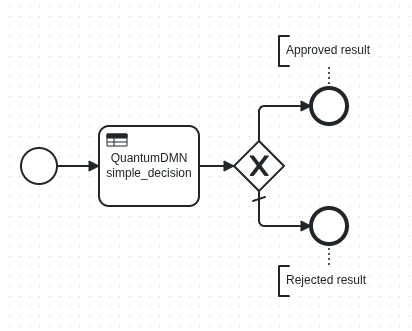
BPMN Process XML
<?xml version="1.0" encoding="UTF-8"?>
<bpmn:definitions xmlns:bpmn="http://www.omg.org/spec/BPMN/20100524/MODEL" xmlns:bpmndi="http://www.omg.org/spec/BPMN/20100524/DI" xmlns:dc="http://www.omg.org/spec/DD/20100524/DC" xmlns:zeebe="http://camunda.org/schema/zeebe/1.0" xmlns:xsi="http://www.w3.org/2001/XMLSchema-instance" xmlns:di="http://www.omg.org/spec/DD/20100524/DI" xmlns:modeler="http://camunda.org/schema/modeler/1.0" id="Definitions_1aa8dca" targetNamespace="http://bpmn.io/schema/bpmn" exporter="Camunda Modeler" exporterVersion="5.38.1" modeler:executionPlatform="Camunda Cloud" modeler:executionPlatformVersion="8.7.0">
<bpmn:process id="Process_04iiy32" isExecutable="true">
<bpmn:startEvent id="StartEvent">
<bpmn:outgoing>Flow_0nvvwuq</bpmn:outgoing>
</bpmn:startEvent>
<bpmn:businessRuleTask id="Activity_1ijk7i6" name="QuantumDMN simple_decision">
<bpmn:extensionElements>
<zeebe:taskDefinition type="quantumdmn-decision" />
<zeebe:ioMapping>
<zeebe:input source="=process_age" target="age" />
<zeebe:output source="=decisionResult" target="approved" />
</zeebe:ioMapping>
<zeebe:taskHeaders>
<zeebe:header key="xmlDefinitionID" value="allowAge_model" />
<zeebe:header key="decisionName" value="AllowAgeDecision" />
</zeebe:taskHeaders>
</bpmn:extensionElements>
<bpmn:incoming>Flow_0nvvwuq</bpmn:incoming>
<bpmn:outgoing>Flow_0ztg4mq</bpmn:outgoing>
</bpmn:businessRuleTask>
<bpmn:sequenceFlow id="Flow_0nvvwuq" sourceRef="StartEvent" targetRef="Activity_1ijk7i6" />
<bpmn:exclusiveGateway id="Gateway_13vlylm" default="Flow_0e7fpjw">
<bpmn:incoming>Flow_0ztg4mq</bpmn:incoming>
<bpmn:outgoing>Flow_0kt470w</bpmn:outgoing>
<bpmn:outgoing>Flow_0e7fpjw</bpmn:outgoing>
</bpmn:exclusiveGateway>
<bpmn:sequenceFlow id="Flow_0ztg4mq" sourceRef="Activity_1ijk7i6" targetRef="Gateway_13vlylm" />
<bpmn:endEvent id="End_approved">
<bpmn:incoming>Flow_0kt470w</bpmn:incoming>
</bpmn:endEvent>
<bpmn:sequenceFlow id="Flow_0kt470w" sourceRef="Gateway_13vlylm" targetRef="End_approved">
<bpmn:conditionExpression xsi:type="bpmn:tFormalExpression">=approved = true</bpmn:conditionExpression>
</bpmn:sequenceFlow>
<bpmn:endEvent id="End_rejected">
<bpmn:incoming>Flow_0e7fpjw</bpmn:incoming>
</bpmn:endEvent>
<bpmn:sequenceFlow id="Flow_0e7fpjw" sourceRef="Gateway_13vlylm" targetRef="End_rejected" />
<bpmn:textAnnotation id="TextAnnotation_0msudo5">
<bpmn:text>Approved result</bpmn:text>
</bpmn:textAnnotation>
<bpmn:association id="Association_1s5cojk" associationDirection="None" sourceRef="End_approved" targetRef="TextAnnotation_0msudo5" />
<bpmn:textAnnotation id="TextAnnotation_1cz23vb">
<bpmn:text>Rejected result</bpmn:text>
</bpmn:textAnnotation>
<bpmn:association id="Association_1eq3bkz" associationDirection="None" sourceRef="End_rejected" targetRef="TextAnnotation_1cz23vb" />
</bpmn:process>
<bpmndi:BPMNDiagram id="BPMNDiagram_1">
<bpmndi:BPMNPlane id="BPMNPlane_1" bpmnElement="Process_04iiy32">
<bpmndi:BPMNShape id="StartEvent_1_di" bpmnElement="StartEvent">
<dc:Bounds x="182" y="162" width="36" height="36" />
</bpmndi:BPMNShape>
<bpmndi:BPMNShape id="Activity_0ceqnvb_di" bpmnElement="Activity_1ijk7i6">
<dc:Bounds x="260" y="140" width="100" height="80" />
<bpmndi:BPMNLabel />
</bpmndi:BPMNShape>
<bpmndi:BPMNShape id="Gateway_13vlylm_di" bpmnElement="Gateway_13vlylm" isMarkerVisible="true">
<dc:Bounds x="395" y="155" width="50" height="50" />
</bpmndi:BPMNShape>
<bpmndi:BPMNShape id="Event_0r2mvop_di" bpmnElement="End_approved">
<dc:Bounds x="472" y="102" width="36" height="36" />
</bpmndi:BPMNShape>
<bpmndi:BPMNShape id="Event_139wrtk_di" bpmnElement="End_rejected">
<dc:Bounds x="472" y="222" width="36" height="36" />
</bpmndi:BPMNShape>
<bpmndi:BPMNEdge id="Association_1eq3bkz_di" bpmnElement="Association_1eq3bkz">
<di:waypoint x="490" y="258" />
<di:waypoint x="490" y="280" />
</bpmndi:BPMNEdge>
<bpmndi:BPMNEdge id="Association_1s5cojk_di" bpmnElement="Association_1s5cojk">
<di:waypoint x="490" y="102" />
<di:waypoint x="490" y="80" />
</bpmndi:BPMNEdge>
<bpmndi:BPMNEdge id="Flow_0nvvwuq_di" bpmnElement="Flow_0nvvwuq">
<di:waypoint x="218" y="180" />
<di:waypoint x="260" y="180" />
</bpmndi:BPMNEdge>
<bpmndi:BPMNEdge id="Flow_0ztg4mq_di" bpmnElement="Flow_0ztg4mq">
<di:waypoint x="360" y="180" />
<di:waypoint x="395" y="180" />
</bpmndi:BPMNEdge>
<bpmndi:BPMNEdge id="Flow_0kt470w_di" bpmnElement="Flow_0kt470w">
<di:waypoint x="420" y="155" />
<di:waypoint x="420" y="120" />
<di:waypoint x="472" y="120" />
</bpmndi:BPMNEdge>
<bpmndi:BPMNEdge id="Flow_0e7fpjw_di" bpmnElement="Flow_0e7fpjw">
<di:waypoint x="420" y="205" />
<di:waypoint x="420" y="240" />
<di:waypoint x="472" y="240" />
</bpmndi:BPMNEdge>
<bpmndi:BPMNShape id="TextAnnotation_1cz23vb_di" bpmnElement="TextAnnotation_1cz23vb">
<dc:Bounds x="440" y="280" width="100" height="30" />
<bpmndi:BPMNLabel />
</bpmndi:BPMNShape>
<bpmndi:BPMNShape id="TextAnnotation_0msudo5_di" bpmnElement="TextAnnotation_0msudo5">
<dc:Bounds x="440" y="50" width="100" height="30" />
<bpmndi:BPMNLabel />
</bpmndi:BPMNShape>
</bpmndi:BPMNPlane>
</bpmndi:BPMNDiagram>
</bpmn:definitions>
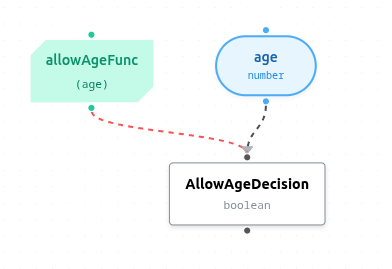
DMN XML
<?xml version="1.0" encoding="UTF-8"?>
<definitions xmlns="https://www.omg.org/spec/DMN/20191111/MODEL/" xmlns:dmndi="https://www.omg.org/spec/DMN/20191111/DMNDI/" xmlns:dc="http://www.omg.org/spec/DMN/20180521/DC/" xmlns:di="http://www.omg.org/spec/DMN/20180521/DI/" id="allowAge_model" name="AllowAge" namespace="https://quantumdmn.com/definitions/allowAge_model">
<inputData id="inputData_a287e529-0027-4fae-af56-2b2ea3066614" name="age">
<variable id="inputData_a287e529-0027-4fae-af56-2b2ea3066614_var" name="age" typeRef="number" />
</inputData>
<decision id="decision_05729af0-1ffa-4ae2-9624-788060219ba3" name="AllowAgeDecision">
<variable id="decision_05729af0-1ffa-4ae2-9624-788060219ba3_var" name="AllowAgeDecision" typeRef="boolean" />
<informationRequirement>
<requiredInput href="#inputData_a287e529-0027-4fae-af56-2b2ea3066614"/>
</informationRequirement>
<knowledgeRequirement>
<requiredKnowledge href="#bkm_cff4dcd0-6558-4765-904f-de68131e25f4" />
</knowledgeRequirement>
<invocation id="invocation_a8c298f7-9dc7-4cf0-9633-81aa3c614e59">
<literalExpression>
<text>allowAgeFunc</text>
</literalExpression>
<binding>
<parameter name="age" />
<literalExpression>
<text>age</text>
</literalExpression>
</binding>
</invocation>
</decision>
<businessKnowledgeModel id="bkm_cff4dcd0-6558-4765-904f-de68131e25f4" name="allowAgeFunc">
<variable id="bkm_cff4dcd0-6558-4765-904f-de68131e25f4_var" name="allowAgeFunc" typeRef="boolean" />
<encapsulatedLogic>
<formalParameter name="age" typeRef="number" />
<decisionTable id="dt_9955ef92-444d-45c2-bdc2-bf5811ccdbf7" hitPolicy="FIRST">
<input id="input_09355653-e571-45e9-820c-5c77707717a5" label="Age">
<inputExpression typeRef="number">
<text>age</text>
</inputExpression>
</input>
<output id="output_3738b3ef-ce3c-4a0b-aa99-39c77a28ffe5" label="Output" name="result" typeRef="boolean" />
<rule id="rule_4d90c301-bea8-48ed-9c7f-4393df59d687">
<inputEntry>
<text>>=25</text>
</inputEntry>
<outputEntry>
<text>true</text>
</outputEntry>
</rule>
<rule id="rule_ab2e4801-3b06-4b7e-92d6-31fc01a5f94d">
<inputEntry>
<text>-</text>
</inputEntry>
<outputEntry>
<text>false</text>
</outputEntry>
</rule>
</decisionTable>
</encapsulatedLogic>
</businessKnowledgeModel>
<dmndi:DMNDI>
<dmndi:DMNDiagram id="DMNDiagram_1">
<dmndi:DMNShape id="dmnshape-decision_05729af0-1ffa-4ae2-9624-788060219ba3" dmnElementRef="decision_05729af0-1ffa-4ae2-9624-788060219ba3">
<dc:Bounds x="73.91111111111114" y="175.61909722222222" width="100" height="80"/>
<dmndi:DMNLabel/>
</dmndi:DMNShape>
<dmndi:DMNShape id="dmnshape-inputData_a287e529-0027-4fae-af56-2b2ea3066614" dmnElementRef="inputData_a287e529-0027-4fae-af56-2b2ea3066614">
<dc:Bounds x="119.32222222222225" y="50.55243055555555" width="100" height="80"/>
<dmndi:DMNLabel/>
</dmndi:DMNShape>
<dmndi:DMNShape id="dmnshape-bkm_cff4dcd0-6558-4765-904f-de68131e25f4" dmnElementRef="bkm_cff4dcd0-6558-4765-904f-de68131e25f4">
<dc:Bounds x="-62.32222222222219" y="55.01909722222222" width="100" height="80"/>
<dmndi:DMNLabel/>
</dmndi:DMNShape>
<dmndi:DMNEdge id="dmnedge-edge_inputData_a287e529-0027-4fae-af56-2b2ea3066614_decision_05729af0-1ffa-4ae2-9624-788060219ba3" dmnElementRef="edge_inputData_a287e529-0027-4fae-af56-2b2ea3066614_decision_05729af0-1ffa-4ae2-9624-788060219ba3">
<di:waypoint x="169.32222222222225" y="90.55243055555556"/>
<di:waypoint x="123.91111111111114" y="215.61909722222222"/>
</dmndi:DMNEdge>
<dmndi:DMNEdge id="dmnedge-edge_bkm_cff4dcd0-6558-4765-904f-de68131e25f4_decision_05729af0-1ffa-4ae2-9624-788060219ba3" dmnElementRef="edge_bkm_cff4dcd0-6558-4765-904f-de68131e25f4_decision_05729af0-1ffa-4ae2-9624-788060219ba3">
<di:waypoint x="-12.322222222222187" y="95.01909722222223"/>
<di:waypoint x="123.91111111111114" y="215.61909722222222"/>
</dmndi:DMNEdge>
</dmndi:DMNDiagram>
</dmndi:DMNDI>
</definitions>
Key configuration points:
- Type:
quantumdmn-decision(this matches our worker's handler). - Headers: We use a custom header
xmlDefinitionIDto tell the worker which decision to evaluate. - Input Mapping: We map process variables (like
process_age) to the decision inputs (likeage).
2. The Java Worker
The worker uses the zeebe-client-java to connect to Camunda and the com.quantumdmn:dmn-java-client to talk to QuantumDMN.
First, add the dependencies to your pom.xml:
<dependency>
    <groupId>io.camunda</groupId>
    <artifactId>zeebe-client-java</artifactId>
    <version>8.5.0</version>
</dependency>
<dependency>
    <groupId>com.quantumdmn</groupId>
    <artifactId>dmn-java-client</artifactId>
    <version>1.1.0</version>
</dependency>
Then, implement the JobHandler:
public class QuantumDmnWorker implements JobHandler {
    private final DmnEngine dmnEngine;

    public QuantumDmnWorker() {
        // Initialize with Zitadel Service Account for SaaS
        Supplier<String> tokenProvider = new ZitadelTokenProvider(
            "path/to/key.json",
            "https://auth.quantumdmn.com",
            "your-zitadel-project-id"
        );

        DmnService service = new DmnService("https://api.quantumdmn.com", tokenProvider);
        this.dmnEngine = new DmnEngine(service, "your-project-id");
    }

    @Override
    public void handle(JobClient client, ActivatedJob job) {
        String decisionId = job.getCustomHeaders().get("xmlDefinitionID");
        String decisionName = job.getCustomHeaders().get("decisionName");

        // Evaluate the Decision
        Map<String, EvaluationResult> results = dmnEngine.evaluate(decisionId, job.getVariablesAsMap());
        EvaluationResult result = results.get(decisionName);

        // Complete the job with the result
        client.newCompleteCommand(job.getKey())
            .variable("decisionResult", result.getValue().getRawValue())
            .send()
            .join();
    }
}
3. Running the Worker
The main application simply connects to Zeebe and registers the worker:
public static void main(String[] args) {
    try (ZeebeClient client = ZeebeClient.newClientBuilder()
            .gatewayAddress("127.0.0.1:26500")
            .usePlaintext()
            .build()) {

        client.newWorker()
            .jobType("quantumdmn-decision")
            .handler(new QuantumDmnWorker())
            .open();

        // Keep running...
        new Scanner(System.in).nextLine();
    }
}
Now, let's fire it up!
mvn exec:java
Or, if you prefer to build a standalone JAR:
mvn package
java -jar target/camunda-integration-worker-1.0.0-SNAPSHOT.jar
Why This Matters
By offloading the decision logic to QuantumDMN, you gain:
- Separation of Concerns: Your process flow remains clean, unrelated to complex business rules.
- Power: You can use the full power of FEEL and DMN 1.5. Feel like defining a recursive function to calculate a loan amortization schedule? Go ahead!
- Auditability: Every decision execution in QuantumDMN is recorded with full trace details, showing exactly why a decision was made.
Try it Yourself
Download the complete example from GitHub, configure your API tokens, and see how easy it is to upgrade your Camunda 8 processes with enterprise-grade decisioning.