Stateful Decisioning in Fintech: Beyond Standard DMN

In the high-stakes world of Fintech—whether it's real-time payment processing, loan origination, or fraud detection—decisions can rarely be made in isolation. A purely stateless "Yes/No" often isn't enough. You need context. You need history. You need Stateful Decisioning.
In this post, we'll demonstrate how QuantumDMN solves a classic Fintech problem that traditional stateless DMN engines struggle with: Velocity Checks.
The Problem: The Velocity Trap
Imagine you are building a Buy Now, Pay Later (BNPL) engine. You have a simple risk rule:
"Approve the loan if the user's risk score is low."
In a standard DMN engine (like Camunda or Drools), this is easy. You send the user's data, the engine calculates a score, and returns Approved.
But what if a fraudster requests 50 small loans in 5 minutes? Each individual loan might be for a small, unsuspicious amount like $50.
A stateless engine sees each request as a brand new event.
- Request 1: $50, Risk Low -> Approved
- Request 2: $50, Risk Low -> Approved
- ...
- Request 50: $50, Risk Low -> Approved
By the time you notice, the fraudster has walked away with $2,500. To stop this, you usually have to query your database before calling the decision engine, effectively "leaking" business logic into your application code.
The Solution: QuantumDMN KPIs
QuantumDMN treats Performance Indicators (KPIs) as first-class citizens. It remembers the history of decisions (the "Ledger") and allows you to build rules based on Time Windows.
Let's model a Velocity Check that automatically rejects a loan if the user has made more than 5 requests in the last 5 minutes.
The KPI Definition
We create a single KPI that tracks request counts using a time window:
<performanceIndicator id="kpi_velocity" name="VelocityCheck" window="5m">
    <aggregation>
        <aggregator name="requestCount" function="COUNT" field="counter"/>
    </aggregation>
    <context>
        <contextEntry>
            <variable name="counter" typeRef="number" />
            <literalExpression><text>1</text></literalExpression>
        </contextEntry>
    </context>
</performanceIndicator>
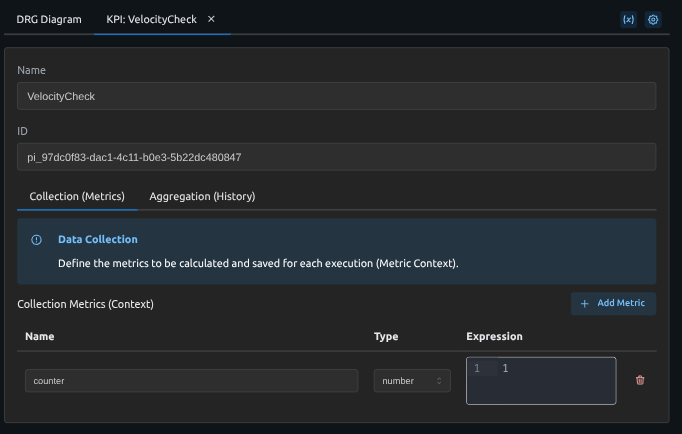
First we define the KPI metrics that should be collected. In this case we just count the number of requests.
Then we define the aggregation function that should be applied to the collected metrics.
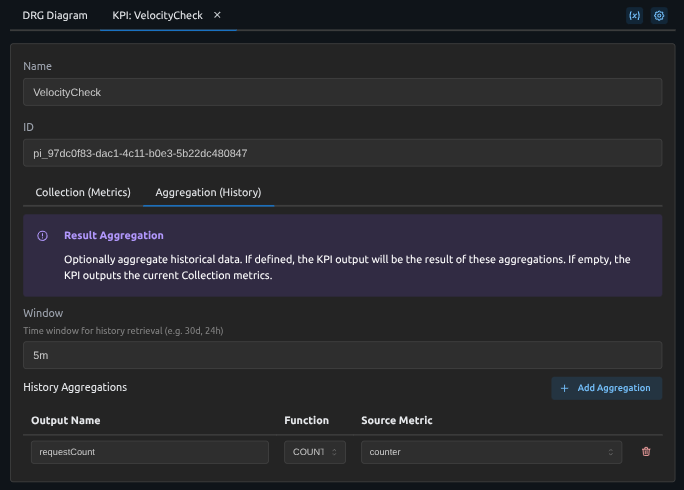
This tells the engine: "Every time this KPI is evaluated, record a value of 1. Count all values from the last 5 minutes."
The Decision
Now we use the KPI in our decision logic:
<decision id="dec_loan" name="LoanApproval">
  <informationRequirement><requiredInput href="#input_risk_score"/></informationRequirement>
  <informationRequirement><requiredPerformanceIndicator href="#kpi_velocity"/></informationRequirement>
  <literalExpression><text>
    if VelocityCheck.requestCount > 5 then "REJECT_VELOCITY_LIMIT"
    else if RiskScore > 80 then "REJECT_RISK"
    else "APPROVED"
  </text></literalExpression>
</decision>
Now, when the fraudster attempts request #6 within 5 minutes, the engine automatically sees the history and rejects the request. No external database query needed.
Advanced: Per-Account Spending Limits
The example above tracks velocity globally. But what if you need to track spending per account over a 24-hour window? For example, enforcing daily spending limits or detecting rapid transaction patterns for the same account.
Dynamic Key Aggregation
QuantumDMN supports dynamic key aggregation using the context put function. This allows you to aggregate values grouped by a dynamic key (like AccountId).
Complete Working Example
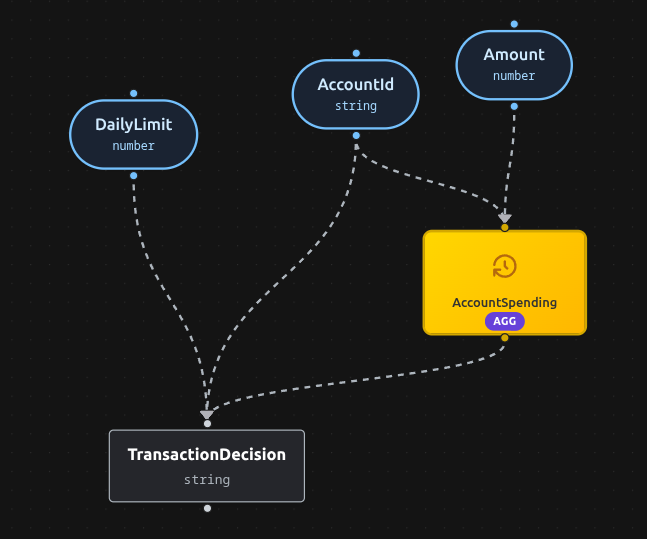
Here is the full DMN XML you can import and test:
The KPI Definition
The AccountSpending KPI tracks spending over a 24-hour window with multiple aggregators:
<performanceIndicator id="kpi_account_spending" name="AccountSpending" window="24h">
    <aggregation>
        <aggregator name="totals" function="SUM" field="context"/>
        <aggregator name="counts" function="COUNT" field="context"/>
        <aggregator name="maxTx" function="MAX" field="context"/>
    </aggregation>
    <context>
        <contextEntry>
            <variable name="context" typeRef="Any" />
            <literalExpression><text>context put({}, AccountId, Amount)</text></literalExpression>
        </contextEntry>
    </context>
</performanceIndicator>
The Decision Table
The TransactionDecision uses a decision table with FIRST hit policy to evaluate multiple conditions:
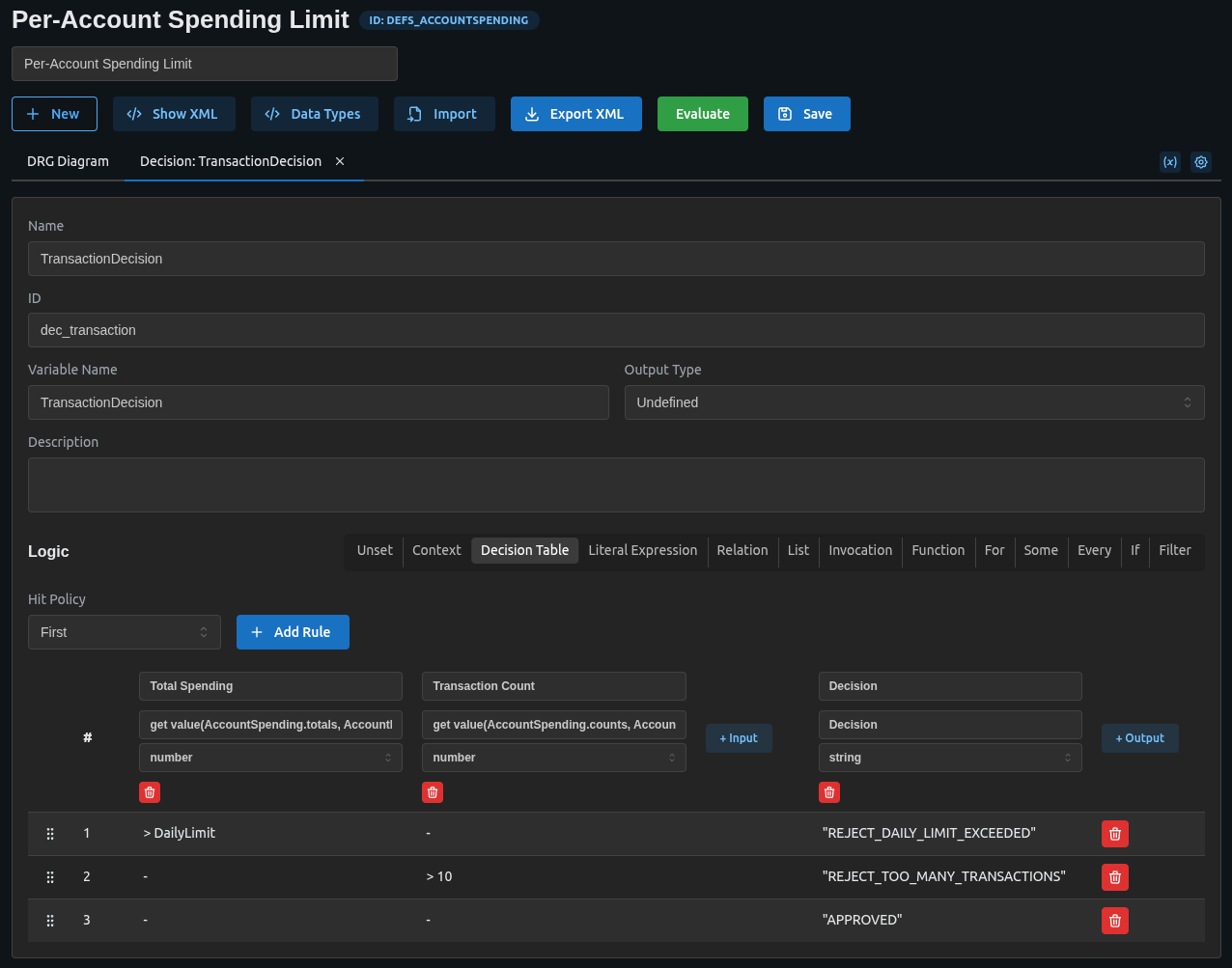
The rules check:
- Daily limit exceeded: If total spending for the account exceeds the
DailyLimitinput - Too many transactions: If the account has more than 10 transactions in 24 hours
- Default approval: If neither condition is met
How It Works
context put({}, AccountId, Amount)creates a context like{"ACC-123": 500}using AccountId as the key- Each evaluation stores this context in the ledger with a timestamp
- The aggregation merges all contexts by key:
totals(SUM): Total spending per accountcounts(COUNT): Number of transactions per accountmaxTx(MAX): Largest single transaction per account
- The decision table uses
get value(AccountSpending.totals, AccountId)andget value(AccountSpending.counts, AccountId)to lookup the current account's aggregated values
Example Scenario
| Evaluation | AccountId | Amount | DailyLimit | AccountSpending.totals | Decision |
|---|---|---|---|---|---|
| 1 | ACC-123 | 500 | 1000 | {ACC-123: 500} | APPROVED |
| 2 | ACC-123 | 300 | 1000 | {ACC-123: 800} | APPROVED |
| 3 | ACC-456 | 200 | 1000 | {ACC-123: 800, ACC-456: 200} | APPROVED |
| 4 | ACC-123 | 400 | 1000 | {ACC-123: 1200} | REJECT_DAILY_LIMIT_EXCEEDED |
Additionally, if an account makes more than 10 transactions within 24 hours, it will be rejected with REJECT_TOO_MANY_TRANSACTIONS.
This pattern enables sophisticated fraud detection scenarios like:
- Per-account daily limits: Reject if account spending exceeds threshold
- Per-account velocity: Track transaction counts per account
- Multi-dimensional analysis: Combine with MIN, MAX, AVG aggregators
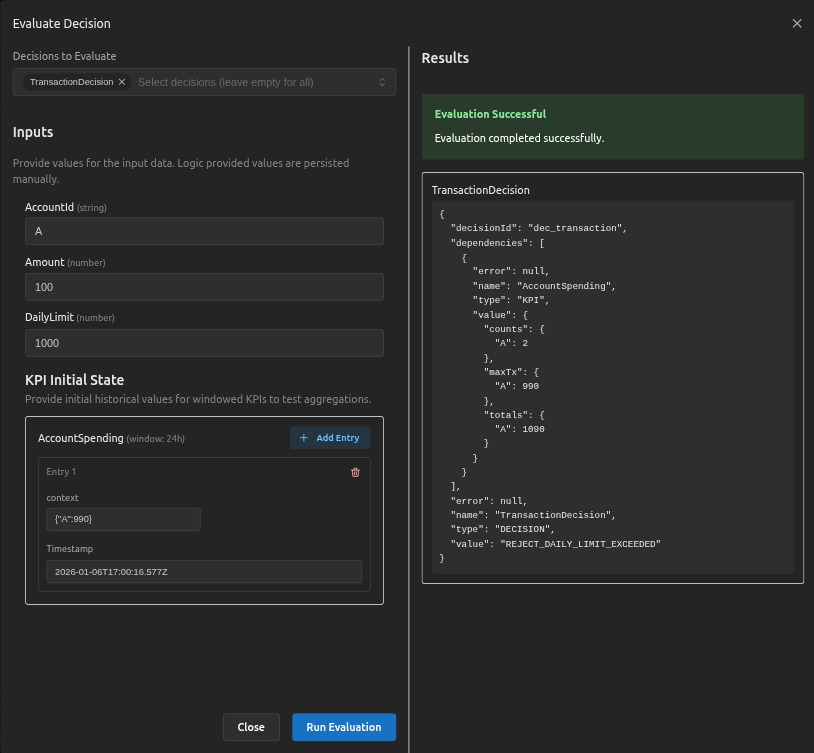
We can test the behaviour using evaluate button in the modeler:
Conclusion
By moving state into the decision model, we've simplified our architecture.
- No external database queries needed for the velocity check.
- Logic is centralized in the DMN model, not scattered in code.
- Real-time protection against rapid-fire fraud attempts.
- Per-entity tracking with dynamic key aggregation.
This is the power of Quantitative Decisioning. It's not just about rules; it's about the broader context of your business operations.